Modern AI Architecture: End-to-End
From the first user query to the response stored in the database. A complete guide to layers, tools, request flow, learning roadmap, and real-world production implementation — including the newly released Google ADK.
 Faisal Affan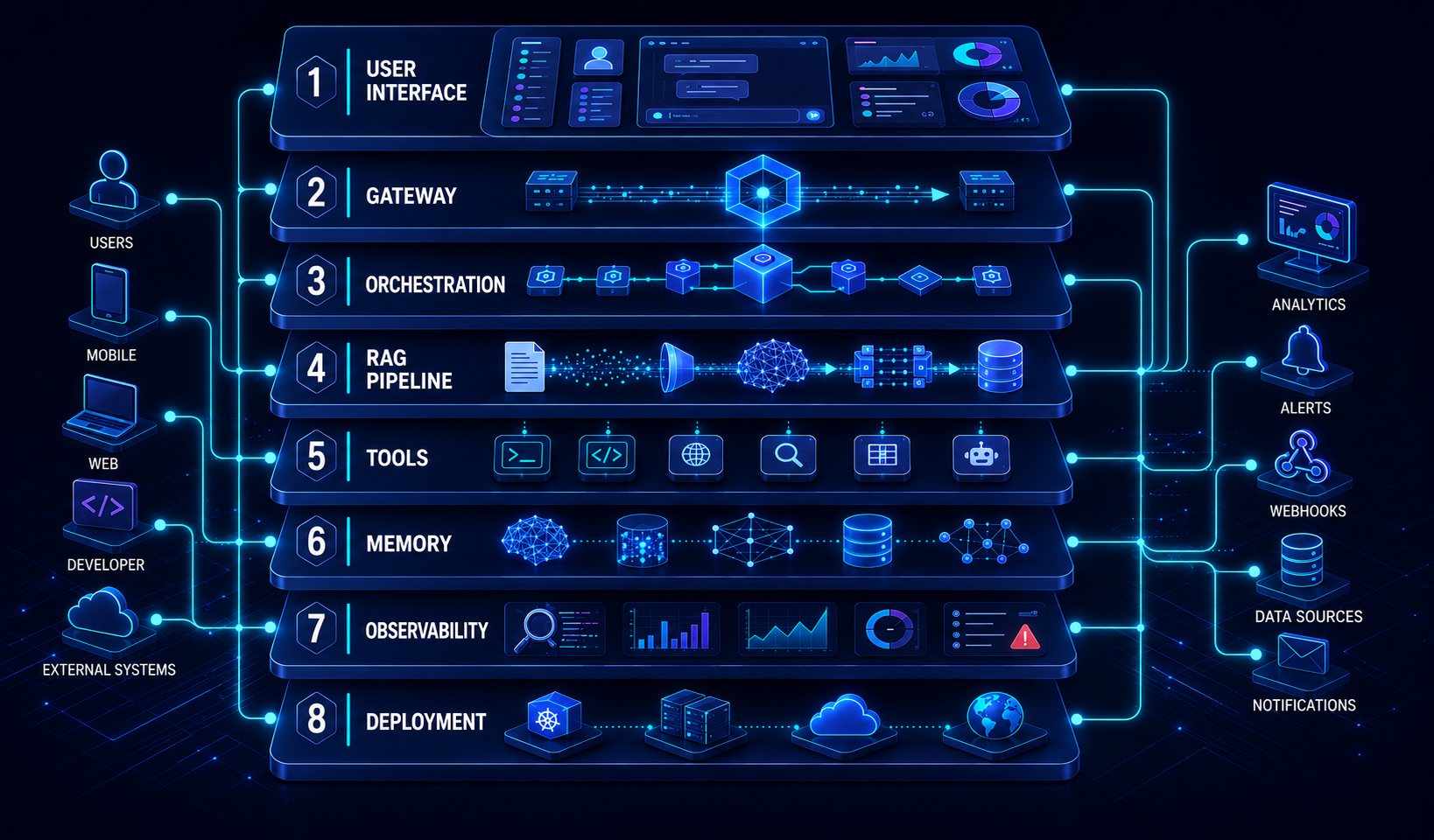
- Modern AI Architecture: End-to-End
- Why You Need to Understand This
- Layer Stack — 8 Architecture Layers
- Request Flow — The Journey of a Single Query
- Fundamental Concepts
- 4.1 ReAct Loop — The Fundamental Pattern of All Agents
- 4.2 Context Window — What the LLM Sees
- 4.3 RAG Pipeline — How It Works in Detail
- 4.4 Tool Calling — Complete Mechanism
- 4.5 Structured Output — From Text to Data
- 4.6 Observability with LangFuse
- Google ADK — New Multi-Agent Framework
- ADK vs Other Frameworks
- AI Response Format in Production
- Learning Roadmap — 8 Weeks
- Production Readiness Checklist
- SCHEMA
- DELIVERY
- ERROR HANDLING
- OBSERVABILITY
- SECURITY
Modern AI Architecture: End-to-End
From the first user query to the response stored in the database. A complete guide to layers, tools, request flow, learning roadmap, and real-world production implementation — including the newly released Google ADK.
CORE PRINCIPLE
What makes an AI system production-grade isn't the model quality — it's the quality of the architecture surrounding the model. Models can be swapped anytime. Good architecture remains solid.
Why You Need to Understand This
LLMs can only do one thing: text in → text out. They cannot remember previous conversations, access databases, execute code, or make multi-step decisions. All the "sophistication" you see in production AI isn't because the model is smart on its own — it's because there's an architecture around the model coordinating all those capabilities.
Understanding this architecture gives you the ability to: choose the right tool for the right problem, design AI systems that are maintainable, and debug when something doesn't work as expected.
Layer Stack — 8 Architecture Layers
A modern AI system consists of 8 layers working together. Click each layer below to see detailed explanations and their tools.
Request Flow — The Journey of a Single Query
Below is the complete journey of a single user query from start to response received. No step happens by magic — everything is explicit and traceable.
Fundamental Concepts
Before diving into specific frameworks, these are 6 concepts you must thoroughly understand. All frameworks — LangGraph, Google ADK, CrewAI — are built on top of these concepts.
4.1 ReAct Loop — The Fundamental Pattern of All Agents
ReAct (Reason + Act) is the fundamental pattern used by all agentic frameworks. The agent loop repeats until the agent is confident the answer is sufficient.
KEY POINT
Tool calling is not magic. The LLM outputs a JSON descriptor {"name": "check_stock", "args": {...}}. The orchestration layer executes the Python function, injects the result back into the context, then the LLM is called again. That's one ReAct cycle.
4.2 Context Window — What the LLM Sees
An LLM is a mathematical function: . No memory, no state. Every call, it reads the entire context from scratch. All of the LLM's "knowledge" in a single request lives within this context window.
| Component | Content | Token Budget | Source |
|---|---|---|---|
| System prompt | Identity, rules, output format, constraints | 200–2,000 | hardcoded by developer |
| Retrieved docs | Relevant chunks from vector DB | 500–4,000 | RAG pipeline |
| Memory | Facts from previous sessions | 100–500 | Mem0 / Redis |
| Tool schema | JSON descriptors of all available tools | 200–800 | tool registry |
| History | Previous conversation turns | 500–8,000 | conversation state |
| User query | Current query | 50–200 | user input |
| Total | — | ~4k–15k | — |
LOST-IN-THE-MIDDLE PROBLEM
LLMs pay more "attention" to the beginning and end of the context. Place important instructions in the system prompt (beginning) and the user query right before generation (end). Retrieved chunks in the middle are prone to being ignored if there are too many.
4.3 RAG Pipeline — How It Works in Detail
RAG consists of two separate phases: Indexing (offline, one-time) and Retrieval (online, per request).
INDEXING (Offline — One-Time Run)
📥 Load documents 🔍 Parse (Docling) ✂️ Chunk (~512 token, 50 overlap) 🧮 Embed (OpenAI / Jina) 💾 Store (pgvector / Qdrant)
RETRIEVAL (Online — Every Request)
🗣️ User query 🧮 Embed query 🔍 Similarity search (top-100) 📊 Rerank (Cohere) top-5 💉 Inject into context
| Situation | Use RAG? | Reason |
|---|---|---|
| Q&A over internal documents (SOPs, catalogs) | Yes (Green) | Data not in LLM training set |
| Real-time data (prices, current stock) | Tool call (Yellow) | Need direct DB query, not RAG |
| General questions (how to use Python) | No (Gray) | LLM already knows |
| Compliance & audit trail | Yes (Green) | Must be able to cite specific sources |
| Inventory forecasting + live data | Hybrid (Blue) | RAG for historical docs, tool call for live data |
4.4 Tool Calling — Complete Mechanism
This is what enables LLMs to interact with the real world. Not magic — it's an explicit, deterministic sequence from the orchestration side.
# Step 1: Define tool as a regular Python function
@tool
def check_inventory(product_id: str) -> dict:
    """Check product stock from database. Args: product_id (str)"""
    return db.query("SELECT * FROM products WHERE id = %s", product_id)

# Step 2: LLM receives tool schema in context
# {"name": "check_inventory", "description": "Check stock...", "parameters": {...}}

# Step 3: LLM output (not execution!) — JSON tool call
# {"type": "tool_call", "name": "check_inventory", "args": {"product_id": "A"}}

# Step 4: Orchestration layer executes the Python function
result = check_inventory(product_id="A")  # {"stock": 142, "safety_stock": 200}

# Step 5: Inject result as tool_result into context
# {"type": "tool_result", "content": {"stock": 142, "safety_stock": 200}}

# Step 6: LLM is called AGAIN with complete context + tool result
# This time the LLM can generate the final answer based on real data
4.5 Structured Output — From Text to Data
Without structured output, the LLM is a text source. With structured output, the LLM becomes a callable function like an API — its output can be directly processed by code without manual parsing.
import instructor
from pydantic import BaseModel, Field
from typing import Literal

# 1. Define the desired schema
class InventoryAlert(BaseModel):
    product_id: str
    current_stock: int = Field(ge=0)
    status: Literal["ok", "low", "critical", "stockout"]
    reorder_suggested: bool
    suggested_quantity: int | None = None
    reason: str = Field(max_length=200)

# 2. Instructor wraps the LLM client
client = instructor.from_anthropic(Anthropic())

# 3. Response is directly a Python object — not a string
alert = client.messages.create(
    model="claude-sonnet-4-6",
    max_tokens=500,
    response_model=InventoryAlert,  # inject schema into tool calling
    messages=[{"role": "user", "content": context}]
)

# alert.status == "low" — type-safe, use directly
if alert.reorder_suggested:
    trigger_purchase_order(alert.product_id, alert.suggested_quantity)
WHY INSTRUCTOR, NOT JSON MODE?
JSON mode only guarantees the output is valid JSON — schema fields can still be missing or have wrong types. Instructor injects the Pydantic schema into the tool calling mechanism, validates the output, and auto-retries 3x if the output doesn't match the schema. That's what makes it reliable in production.
4.6 Observability with LangFuse
LangFuse is a dedicated AI observability layer — analogous to Grafana for infra, but for LLM calls. Its data hierarchy: Trace (one end-to-end request) Span (unit of work) Generation (one LLM call) Score (evaluation).
# Simplest approach: LiteLLM integration (1 line)
import os
os.environ["LANGFUSE_SECRET_KEY"] = "sk-lf-..."
os.environ["LANGFUSE_PUBLIC_KEY"] = "pk-lf-..."
litellm.success_callback = ["langfuse"]  # all LLM calls auto-traced

# Or via decorator for custom spans
from langfuse.decorators import observe

@observe(name="inventory-analysis")
def analyze_inventory(query: str) -> str:
    chunks = retrieve_docs(query)     # becomes a child span
    answer = generate_answer(query, chunks)  # becomes a child span
    return answer

# What gets captured per generation:
# latency, input/output tokens, cost, faithfulness score, user feedback
Google ADK — New Multi-Agent Framework
GOOGLE AGENT DEVELOPMENT KIT
Open-source framework from Google to build, test, and deploy AI agents. Native Gemini, but supports other models. Designed for multi-agent production use cases with the A2A (Agent-to-Agent) protocol.
| Component | Function | LangGraph Analogy |
|---|---|---|
| Agent | Basic unit. LlmAgent (reasoning) or WorkflowAgent (deterministic) | Node in a graph |
| Tools | Python function callable by the agent. Auto-converts to function calling schema | Tool in LangGraph |
| Runner | Engine that executes the agent loop | graph.invoke() |
| Session | Per-user conversation state, persistent | Checkpointer |
| A2A Protocol | Agent-to-Agent communication. Sub-agent can be called as a tool | Subgraph |
| Deployment | Local dev, Vertex AI (managed), or self-hosted ADK server | LangGraph Cloud / self-host |
from google.adk.agents import LlmAgent
from google.adk.tools import tool
from google.adk.runners import Runner
from google.adk.sessions import InMemorySessionService

# 1. Define tool
@tool
def check_stock(product_id: str) -> dict:
    """Check product stock from inventory database"""
    return db.get_stock(product_id)

# 2. Create agent
inventory_agent = LlmAgent(
    name="inventory-analyst",
    model="gemini-2.0-flash",
    tools=[check_stock],
    instruction="You are an inventory analyst. Help users understand stock conditions."
)

# 3. Run
session_service = InMemorySessionService()
runner = Runner(agent=inventory_agent, session_service=session_service)

response = runner.run(
    user_id="user_123",
    session_id="session_abc",
    message="What is the current stock of product A?"
)
ADK vs Other Frameworks
| Framework | Strengths | Trade-offs | Choose when |
|---|---|---|---|
| Google ADK | Native multi-agent, Vertex AI, A2A protocol | Python only, small community | Need production-grade multi-agent on Google Cloud |
| LangGraph | Mature, graph state machine, checkpointing | Thick abstraction, LangChain dep | Complex stateful agent, human-in-the-loop |
| CrewAI | Intuitive, role-based, fast prototyping | Less flexible for complex flows | Quick prototyping, workshops |
| Pydantic AI | Type-safe, minimal, Pythonic | Limited ecosystem | Simple agent with strict type safety |
AI Response Format in Production
A good response format isn't about aesthetics — it's about predictability, parsability, and a contract that doesn't change when the model is updated.
For data pipelines, background jobs, document analysis. Fully type-safe via Instructor + Pydantic.
class InventoryInsight(BaseModel):
    product_id: str
    action: Literal["reorder", "hold", "liquidate"]
    urgency: Literal["immediate", "this_week", "this_month"]
    confidence: float = Field(ge=0.0, le=1.0)
    suggested_quantity: int | None = None

insight = client.messages.create(
    response_model=InventoryInsight,
    messages=[{"role": "user", "content": context}]
)
# insight.action == "reorder" — use directly, no parsing
For chat interfaces. SSE (Server-Sent Events) via FastAPI. TTFT (Time to First Token) < 500ms for good perceived performance.
@app.post("/chat/stream")
async def chat_stream(request: ChatRequest):
    async def generate():
        with client.messages.stream(
            model="claude-sonnet-4-6",
            messages=request.messages
        ) as stream:
            for text in stream.text_stream:
                yield f"data: {json.dumps({'token': text})}\n\n"
        yield "data: [DONE]\n\n"
    return StreamingResponse(generate(), media_type="text/event-stream",
        headers={"Cache-Control": "no-cache", "X-Accel-Buffering": "no"})
Metadata wrapper around every AI response. Important for observability, audit trail, and production debugging.
class AIResponse[T](BaseModel):
    request_id: str        # for tracing
    trace_id: str | None   # LangFuse trace ID
    model: str
    latency_ms: int
    input_tokens: int
    output_tokens: int
    cost_usd: float
    data: T                  # main payload (InventoryInsight, etc.)
    confidence: float
    fallback_used: bool = False
    retry_count: int = 0
    context_sources: list[str] = []  # chunk ID from RAG (audit trail)
    generated_at: datetime
AI endpoints fail differently from regular APIs. Needs a special error taxonomy with a retryable flag so the frontend can handle it correctly.
class AIErrorCode(str, Enum):
    VALIDATION_FAILED   = "validation_failed"   # Instructor retries exhausted
    CONTEXT_TOO_LONG    = "context_too_long"    # exceeds context window
    MODEL_UNAVAILABLE   = "model_unavailable"   # all providers down
    RATE_LIMITED        = "rate_limited"        # quota exhausted
    TIMEOUT             = "timeout"             # inference too long

class AIErrorResponse(BaseModel):
    error_code: AIErrorCode
    retryable: bool         # True = rate_limited/timeout; False = validation
    retry_after_seconds: int | None
    request_id: str
Learning Roadmap — 8 Weeks
The optimal learning sequence based on concept dependencies. No shortcuts — each week builds the foundation for the next.
Understand how to call LLMs via API, model differences, token pricing. Master Instructor + Pydantic — this is the foundation of all other AI tools. Without this, you won't be able to debug issues at the layers above.
Wrap LLM calls in a REST API using FastAPI. Add LiteLLM for multi-provider routing. Implement a streaming endpoint. Deploy via Docker. This skill goes straight onto your resume and can be used in real projects immediately.
Build a document Q&A system. Ingest PDF chunk embed store in pgvector retrieve rerank inject into prompt. LlamaIndex handles the orchestration pipeline. This is the most sought-after skill in AI job postings.
Build an agent that can reason, call tools (search, SQL, API), and loop until the task is complete. LangGraph is a graph state machine for complex agent workflows. Learn checkpointing and human-in-the-loop patterns.
Integrate LangFuse into all LLM calls. Track latency, token cost, and output quality per request. Set up RAGAS for RAG pipeline evaluation. Without this, you're blind in production. Self-hosted for free, great UI, integrates with K8s.
Learn Google ADK for multi-agent orchestration on top of Gemini. Concepts: sub-agent, tool registry, session management, A2A protocol. Great for your portfolio since it's the newest and increasingly sought after by employers using Google Cloud.
Combine all concepts into a single demo-ready project. Example: inventory Q&A agent — user asks in natural language agent RAG + query DB + generate insight stream response. Deploy to K8s with LangFuse tracing active.
V1 PRIORITY STACK
FastAPI + LiteLLM + LlamaIndex + LangGraph + pgvector + LangFuse + Instructor. This covers 90% of mid-level AI engineer job requirements. Master these 7 tools to production depth before expanding to others.
Production Readiness Checklist
Use this before deploying any AI feature to production. Every missed item is a potential incident.
SCHEMA
- All fields typed, no
dictorAny - Nullable fields marked explicit
Optional/None - Numeric fields have constraints (
ge=0,le=1.0, etc.) -
LiteralorEnumfor fields with limited values
DELIVERY
- Batch endpoint for data pipelines (JSON + Pydantic)
- Streaming endpoint for chat interfaces (SSE)
- SSE headers correct:
Cache-Control: no-cache,X-Accel-Buffering: no - Timeout set (not infinite wait)
- Max tokens set explicitly on every LLM call
ERROR HANDLING
- Validation errors caught before entering DB
- Retry logic in place (Instructor 3x default, or manual)
- Error response has
retryableflag -
request_idpresent in every response for tracing - Fallback provider configured in LiteLLM
OBSERVABILITY
-
trace_idlinking to LangFuse in every response -
latency_mslogged per request - Input/output tokens logged for cost monitoring
-
context_sources(chunk IDs from RAG) logged for audit trail - PII masking configured in LangFuse before go-live
SECURITY
- Prompt injection protection — validate user input before it reaches the system prompt
- Rate limiting per user / per endpoint
- API keys not hardcoded — use env vars or secret manager
- Output validation — AI output entering DB must go through Pydantic
FastAPI · LiteLLM · LlamaIndex · LangGraph
pgvector · LangFuse · Instructor · Kubernetes